Map Marker is a true gem among location-based apps. It focuses on one core idea - saving and organizing places - and does so exceptionally well through its Android, iOS, and web apps. Instead of trying to be a full navigation or fitness platform, Map Marker excels at what many outdoor and travel apps surprisingly overlook: giving you a clean, structured way to collect locations that matter to you.
Whether you’re marking mountain peaks, viewpoints, monuments, trees, parking spots, or future hiking ideas, Map Marker lets you organize locations into folders, assign icons, add notes, and view everything clearly on a map. It stays lightweight and intuitive, yet powerful enough to export your data (GPX/KML) and integrate with other mapping or navigation tools when needed.
The result is an app that feels deliberately focused - quick to use in the field, pleasant to browse later on the web, and flexible enough to fit into more advanced outdoor workflows.
Main Features
Who is this app for
Map Marker is ideal for anyone who wants to collect and organize locations without the complexity of full navigation or sports-tracking apps. It works particularly well for hikers, travelers, explorers, photographers, and curious map lovers who like to keep track of places they’ve visited - or plan to visit - in a structured way. If you’ve ever thought “I wish I had all these places saved neatly on a map”, this app is for you.
What you can do with it
At its core, Map Marker lets you save locations and organize them into folders (collections). Each location can have a name, notes, and a custom icon, making it easy to visually distinguish different types of places. All saved points are displayed on a map, giving you a clear overview of everything you’ve collected so far. You can also export your data (for example as GPX or KML) and open saved locations in external navigation apps when needed.
Offline usage
Map Marker works surprisingly well offline for its main purpose. You can save your current GPS location even without an internet connection, which is perfect when hiking in areas with poor signal. Your location will be stored locally and synced later if you use cloud sync. Map Marker relies on external apps for navigating to saved locations. If your external app handles offline navigation, then you're all set!
Example usage
Example: Building a collection of visited mountain peaks
One very natural use case is keeping a list of mountain peaks you’ve already climbed. When you reach a summit, you simply save your current GPS position, give it the peak’s name, and place it in a folder like “Visited Peaks”. Over time, this turns into a personal visual diary of your hikes - all your summits neatly marked on a map. For example:

You can assign custom tags to collections. In this example collection of "Visited Peaks" I've added "Height" and "Date visited" as custom tags, so these are available to all markers in the collection:

Example: Building a collection of peaks you want to visit
Map Marker isn’t limited to places you’ve already been to. You can also tap anywhere on the map and save a location manually, which is perfect for planning future hikes. For example, you might create a folder called “Peaks to Visit” and add summits you’ve spotted on maps, read about online, or seen from afar. This makes Map Marker a great planning companion as well as a logbook.
Example: Navigating to a saved location
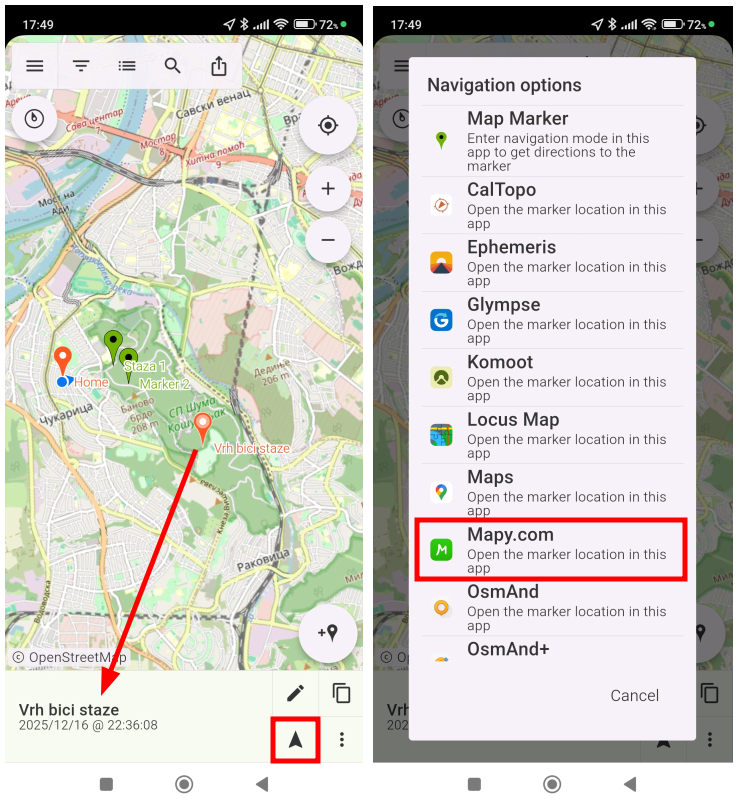
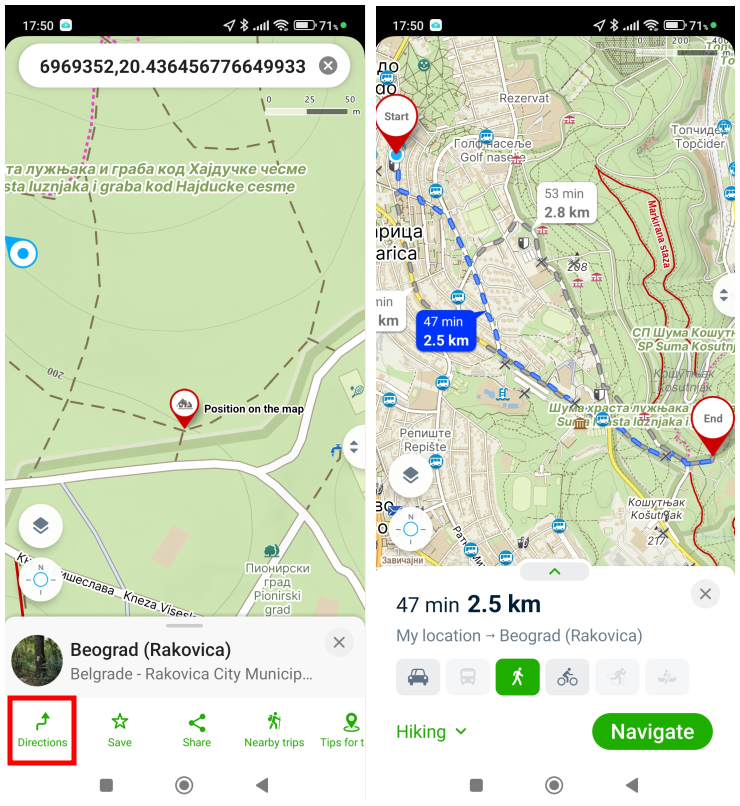
Once you have a saved point, navigating to it is simple. Clicking the "navigate-to-location" button for a saved location, Map Marker opens a dialog with available navigation apps and shows the marker location in the selected app. You can then trigger navigation to that location in that app. This keeps Map Marker focused and lightweight, while still letting you rely on a full navigation engine when you actually need turn-by-turn directions. In our example below, we used Mapy.com as the navigation app.
Other features worth mentioning
Map Marker also has the following features:
- Simple bearing-based navigation to a saved location
- Adding shapes as markers
- Adding recorded tracks as markers
- Sharing text-based location details of a marker, including the Google Maps link
What you can’t do with Map Marker
Map Marker is deliberately focused, and that’s a good thing - but it’s important to know its limits. While it does allow you to perform basic track recording, it does not support building routes, or using advanced offline navigation inside the app. There are no elevation profiles, turn-by-turn hiking guidance, or sport-specific analytics. Those features belong to more complex “serious” outdoor apps. Map Marker shines precisely because it doesn’t try to do everything.
What You Get with the Paid Version
Map Marker uses a one-time purchase (10 USD) to unlock its premium features - no subscription, no recurring fees. This alone makes it refreshing in today’s app ecosystem.
Premium features include
- Removing ads
- Unlimited folders and markers
- Exporting markers (GPX, KML)
- Cloud synchronization
- Sharing and collaboration features
Cloud synchronization explained
One of the biggest advantages of the paid version is cloud sync. Instead of your markers living only on your phone, you can connect Map Marker to a cloud provider (Google Drive, Dropbox). This allows your data to be shared between the mobile apps and the web app.
In practice, this means you can:
- Add markers in the field on your phone
- Open the web app later at home
- View, edit, and organize the same points on a larger screen
For anyone who enjoys planning hikes, reviewing past trips, or simply keeping their location data safe and backed up, cloud sync turns Map Marker into a much more powerful tool.
Platform, Pricing and Rating
Map Marker is available on Android, iOS and also as a web app. Detailed documentation for all three platforms is available on the Map Marker website.
Premium features are available for a one-time fee of 10 USD.
Ratings differ per platform:
| Platform | Rating |
|---|---|
| Android | 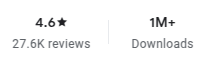 |
| iOS |  |
Alternative Apps
While Map Marker is excellent for collecting and organizing places, there are other location-saving apps that serve slightly different needs:
Save Location GPS (by Rayo Innovations)
Save Location GPS is a very simple and lightweight app focused on quickly saving your current location. It’s great if you just want a one-tap way to jot down where you parked, camped, or stopped briefly - but it lacks the folder organization, custom icons, export options, and cloud sync that make Map Marker so powerful. This makes it most suitable for basic use rather than long-term collections.
Locus Map (Free version)
Locus Map is a full-featured outdoor mapping app with extensive offline maps, track recording, and navigation tools. The free version lets you save points and view them on detailed maps, and while its organization and tagging are more robust than Save Location GPS, it’s still more complex than Map Marker’s focused workflow. Locus shines for serious hiking, biking, and route planning, especially if you want offline capabilities and built-in navigation - but for straightforward location collections and simple place management, Map Marker is usually easier and faster to use.
Final Verdict
Map Marker is an excellent choice if your main goal is to collect, organize, and revisit locations without unnecessary complexity. It pairs beautifully with more advanced navigation apps and fills a gap that many outdoor tools overlook.
Comments
Powered by FastComments